06 February 2025 (Audio Visual Evening)

This week members of Musselburgh Camera Club travelled to Beeslack Community High School to meet with members of Beeslack Penicuik Camera Club for our annual audio visual evening. Beeslack’s usual room was occupied by a Taekwondo class, so we started the evening in a small classroom.

Musselburgh started with an introduction to ICM photography in Butterdean Wood, created by Steven Beard, based on the club photoshoot from July 2024. Then, Beeslack’s presented a history of coal mining in Scotland, based on information and materials picked up from a club visit to the National Mining Museum, supplemented by club photographs and drone shots. There was a change of mood with the third presentation, when Derek Muller showed a video entitled “Birds Having Lunch” featuring some great shots of wild birds feeding. The change of mood continued when Beeslack showed another beautiful and calming creation by Brian Nicolson, featuring photographs of trees and woodland enhanced and blended with art filters from paint.NET. Musselburgh followed with a presentation compiled from photographs taken by club members on a photoshoot to the Balgone Sunflower Trail. This was followed by Beeslack’s presentation on the history of East Lothian, which used to be known as Haddingtonshire. The presentation took us on a journey through time, from the battles for dominance between the tribes of ancient Scotland and the construction of castles, to the witch trials and the impact of all this history on the modern landscape of East Lothian. Melanie Gallacher followed with a musical video in celebration of her daughter, and then Beeslack finished with an inspiring collection of long exposures of a fire dancer, set to Stravinsky’s The Firebird. And on that note we finished the evening and retired to Beeslack’s usual room for tea and biscuits. Thank you Beeslack for hosting us.

  • Next week (Thursday 13th) we have another flexible Members Evening. I propose that we have a session on camera skills. Please bring your camera (plus a macro lens and a flash if you have one). If you have any interesting small objects to photograph, bring those along as well. I’m especially interested in moving objects (such as a pendulum or a dancing robot), if you have any.
  • I am planning to demonstrate the settings on my Nikon camera. It would be good to have volunteers to cover Canon, Sony and Panasonic cameras as well.

See you next week.

15 February 2024 (Audio Visual Evening)

This week we hosted our annual audio visual evening with Beeslack Penicuik Camera Club. Two years ago we had hosted this meeting by Zoom in room G3, but this year we were fully back to normal. Members of both clubs met in room G6 of the Fisherrow Centre and were treated to tea, sandwiches and cakes by Liz Sowler, Ed Robertson and Carol Edmond.

Beeslack began the evening with a beautiful presentation created by Brian Nicolson, made from photographs of woodland scenes in Midlothian paired with inspirational music. Musselburgh then resurrected a presentation made by Steven Beard in 2012 describing his 2008-2009 trip to the Cerro Paranal Observatory Chile to commission the VISTA Infrared Camera. The place had also been used as the secret lair of the villain in the James Bond film Quantum of Solace. The VISTA Infrared Camera was decommissioned in 2023, bringing the story to an end. Beeslack then showed their club presentation which celebrated the “Environs of Penicuik”. It featured a selection photographs from historical monuments and scenic places to visit around Penicuik taken by their club members.

The meeting then changed tack and showed a YouTube video created by Musselburgh member Derek Muller entitled “Getting Started in Screen Printing”. The video showed us how to use a MiSCREEN silk screen printer to transfer an artwork or black and white photograph onto paper, or a T-Shirt, etc… Derek creates his videos with a camera or iPhone and edits them using iMovie. Beeslack then showed a supplement to their club presentation which demonstrated the artistic filters applied by Bill Baird. Photographs of the Midlothian countryside were transformed into artworks before our eyes. This was followed by a short video showing a visit to the Edinburgh Festival Fringe by Musselburgh member Kevin Johnston and then a presentation showing a visit to Alicante, Spain in 2019 by Beeslack member Mike Walby.

The evening finished with three short presentations. Derek Muller showed a video of the waves crashing onto the shore at Portobello beach, which featured some lovely slow motion effects and a passer by who looked like they were going to get soaked but escaped. Then we watched a Beeslack video showing the Fells, Becks and Lakes of the Lake District. Beeslack also chose the perfect presentation on which to close the evening: a celebration of Valentine’s Day created by Gordon Peerless. We finished with a discussion over tea and cakes.

Thank you to Beeslack for visiting and showing their presentations, and thanks again to Liz, Ed and Carol for the catering. Next week Eddie Telford will be returning to give a talk on “Around the World in 80 Images”. See you there.

02 February 2023 (Audio Visual Evening at Beeslack CC)

The week Musselburgh Camera Club members travelled to Beeslack High School in Penicuik to join members of Beeslack Penicuik Camera Club for an Audio Visual evening.

The evening began with a MCC presentation by Allan Cameron on the “Battle of Prestonpans“, describing how forces lead by Charles Edward Stuart had achieved victory over Johnnie Cope’s government forces at Prestonpans, and showing photographs captured at the battle re-enactment.

Beeslack then presented a historical narrative on the creation and expansion of Edinburgh’s New Town, using a combination of old and new maps and some fascinating archive photographs showing the construction of Edinburgh’s most iconic buildings and the construction of bridges (such as North Bridge and Regent Bridge) spanning difficult chasms that we don’t even notice today.

Musselburgh’s Mike Clark then presented a unique record into the sites and sounds of underwater photography, showing the incredible variety of wildlife living in Scotland’s coastal waters.

Beeslack’s second audio-visual was on the construction and demise of the Edinburgh to Peebles railway, using a clever combination of “before and after” photographs to show how the railway used to look and what is left now. Drone footage showed us how the railway route is still visible in the landscape.

The evening finished with a recording of the Edinburgh Hogmanay Fireworks made by Steven Beard from a vantage point on Blackford Hill to test out his new camera microphone.

  • This week George Todd is accepting entries for the third and final part of our set subject competition. Please send your 2 JPEGs on the theme of “Landscape” to George by Thursday.
  • Next week (9th February) we have our Digital Photo Feedback session. In this session we will include some demonstrations on how to make digital enhancements in Photoshop. So please bring along images that you think could be improved with a bit of tweaking. Joe Fowler will also use this evening to demonstrate how to use the mount cutter.

I have finally written up the presentation that John Glynn gave us a couple of weeks ago. Click the link below if you are interested. See you on Thursday.

19 January 2023 (John Glynn: How to See Creatively)

10 February 2022 (Audio Visual Evening)

This week we once again hosted our annual audio visual evening with Beeslack Penicuik Camera Club. Little did we know when we hosted this meeting a year ago that a year later we would still be hosting it by Zoom. A major difference this time was that the meeting was also broadcast in room G3 of the Fisherrow Centre.

The meeting began with a presentation from Beeslack about The Union Canal, following the route of the canal from its beginning in Edinburgh to its merger with the Forth and Clyde Canal at the Falkirk Wheel. With a combination of ground-based photographs and drone shots, were treated to a virtual journey, visiting the many landmarks which the canal passed (such as the Edinburgh International Climbing Arena the Almond Aqueduct, Linlithgow Palace and the Falkirk Tunnel).

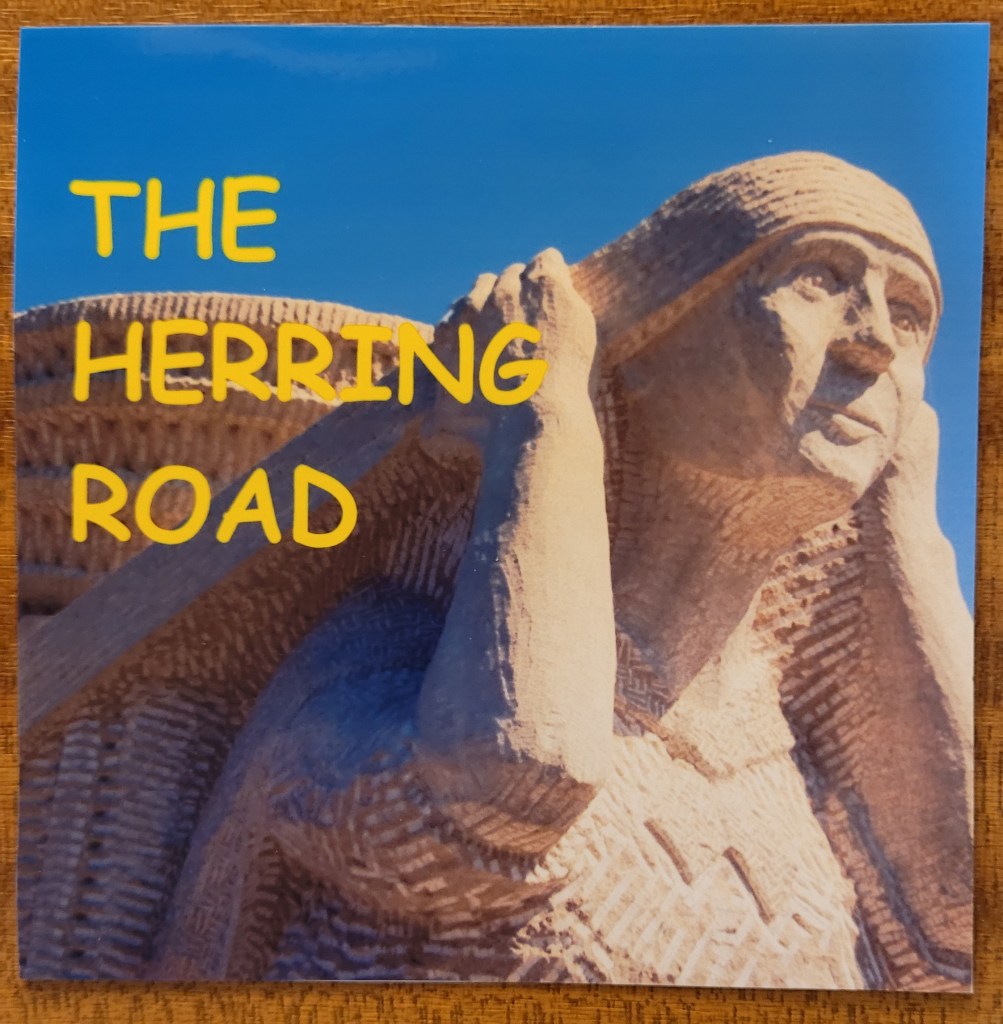
Next, Musselburgh showed the long-awaited presentation from John Knox and Gus Langlands’ Landscape Group entitled “The Herring Road”.

The Herring Road. A Landscape Group Presentation

The presentation began by describing the history of the fishing industry at Dunbar and, through archive photographs, telling the story of the Dunbar fishwives. The presentation was in several parts, each introduced with a reading by Jennifer Davidson. It took us on a 29 mile journey along the Herring Road, which the fishwives used to carry their heavy baskets and creels of fish to sell at the market in Lauder. We were again taken on a virtual journey along this route, visiting landmarks such as the village of Spott, the Witches Stone, the Whiteadder Reservoir, and through the Lammermuir Hills to Lauder. It looked difficult enough to make that journey with photographic equipment, let along while carrying several stone of fish. After the fishwives had sold their fish in Lauder, they had to make the return journey back to Dunbar, being careful to avoid thieves who might want to steal the money they had made. The presentation returned to Dunbar and, by contrast, showed us the modern view of the town and described the modifications which made Dunbar Harbour the way it looks today.

We finished the evening with a series of short presentations from Beeslack, bringing us introductions to the Scottish Wildlife Centre, the City of Edinburgh, Shetland and Australia. All in all it was a fascinating and entertaining evening. Thank you to Beeslack for joining us. You didn’t get any tea and biscuits for a second year running, but I hope we can correct that the next time we host this meeting.

Software and Licencing for Audio Visual Presentations

After the audio visual evening we discussed the software used to create audio visual presentations. I use Proshow Producer, which has now been replaced by Photopia (https://photopia.nl/proshow/), a subscription-based application. Beeslack recommended a utility called WNSoft PTE AV Studio 10 (https://www.wnsoft.com/en/pte-av-studio/), which can generate shows for Windows, Apple and Android devices.


Stephen Williams has also found the following free video creation applications for people interested in creating AV presentations and sends this message to members:

They are relatively intuitive, but they each have their pros and cons.  They are available as portable versions (PortableApps.com) which I prefer, or you can download installable versions directly from the provider’s websites.  Both of these struggled to work on my 7-year old AMD laptop (running Windows 10), but ran on my 2-year old i7 laptop (also running Windows 10).

OpenShot (https://www.openshot.org/)

Bright, intuitive interface (drag images, videos and audio files into the project file area, then drag down to the timeline, right click to add transitions and effects – see the quick user guide before you start at https://www.openshot.org/user-guide/).  I found that the software kept crashing, but it seemed to remember where it was when it reloaded.  However, maybe I was just trying to push it too hard.  I was unable to access the Preferences menu where I might have been able tweak the settings to stop this happening – I don’t know why, this may just be a bug with the current version.  Others might have more luck.

Shotcut (https://shotcut.org/)

This has a more cluttered interface on first opening, but ultimately the process is more or less the same as OpenShot.  Check out the short video on how to use it at https://www.youtube.com/watch?v=JtsB2iZRb9c&feature=emb_logo – this is essential even just to get going.  Adding effects are a bit more fiddly – you need to create Keyframes and how you want the image to look at both the start and end of the effect period and the software then interpolates, but ultimately this is more flexible than OpenShot.  Transitions between slides were easier to implement, but the options were more limited than OpenShot (but there are only so many garish transitions that you can tolerate anyway).  One other nice thing was that once you reopened a saved project and added more slides to the end of the timeline, as long as the original audio track was long enough it filled in the gap – with OpenShot you were left with blank audio and would need to reimport the original longer audio track.  Crucially for me the software was stable, not crashing during use.  So although it took longer to learn how to what I wanted it to do, this was the better choice for me.


Finally, Beeslack member John Barnett has drawn our attention to the website of the IAC Film and Video Institute (https://www.theiac.org.uk/),  where you can find advice and purchase an audio dubbing licence for video presentations.


Making Audio Visual Presentations

There is an audio visual evening with Beeslack scheduled for 4th February 2021. Last week I was asked about software for creating audio visual presentations from photographs. Microsoft Powerpoint can be used to make a presentation, but it can be tedious to use. I gave an introduction to audio visual presentations back in 2018, which you can find by clicking this link.

https://musselburghcameraclub.org.uk/2018/11/26/22-november-2018-introduction-to-audio-visual-presentations/

At the time, the recommended software to use was Photodex ProShow Gold, which was available for Windows only.  There was a Mac alternative called “Photo Theatre Pro” (which may or may not still be available in the Mac store). Sadly, Photodex Proshow is no longer available and has been replaced by “Photopia”.  The good news is the new software now works with both Windows and Mac. It has a subscription-based licence, so you could subscribe only when you need to make a show. Click the link below for more information.

http://photopia.nl/proshow/

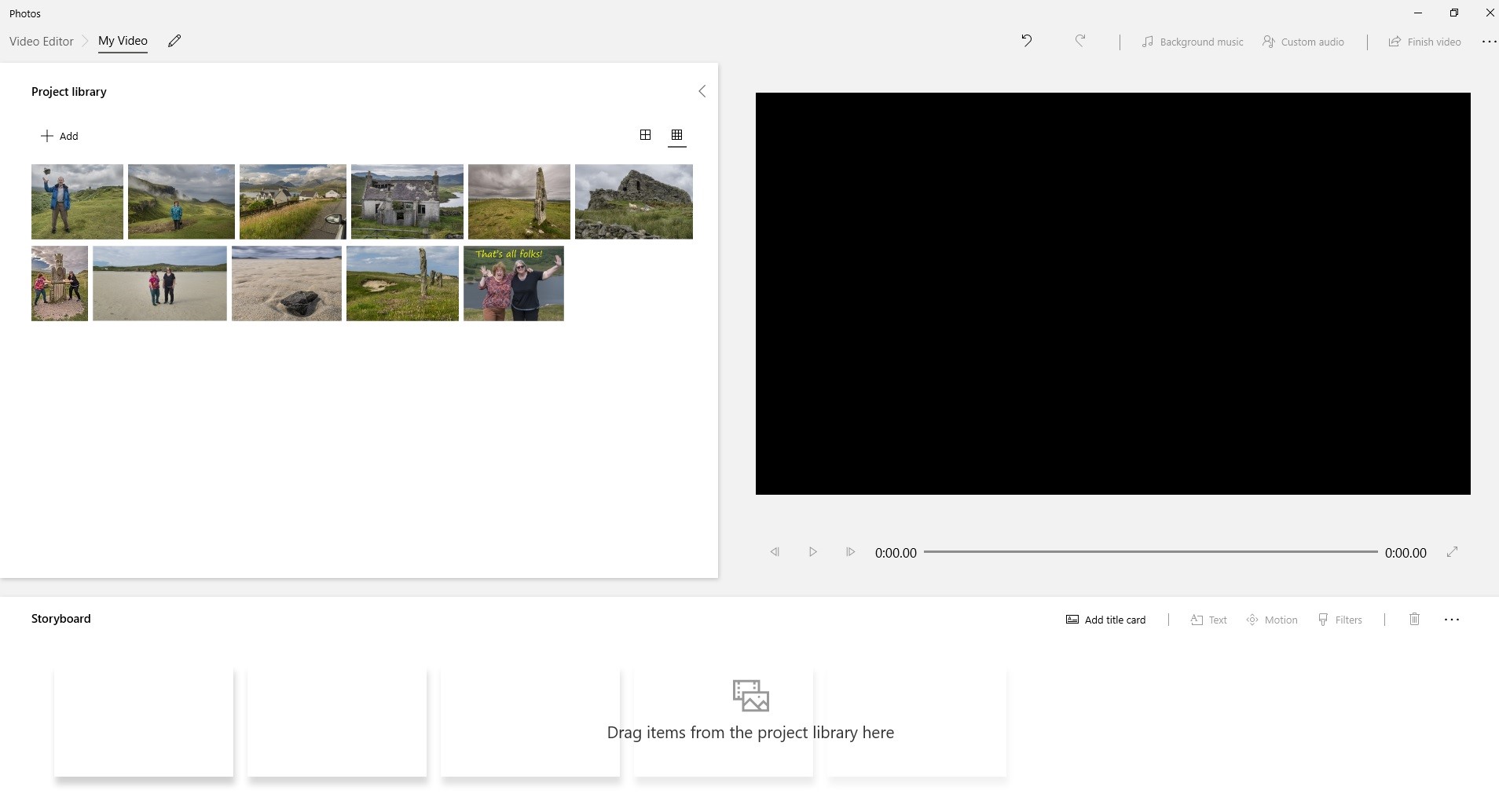
However, if you have Windows 10, the free Microsoft Photos program also contains some of the basic elements that Proshow Gold used to have. You can combine images into a slideshow or video, add a title slide, add captions and add background music. I think this is now a better option than Powerpoint for Windows users. You can start the program by selecting the images you want to show, clicking with the right mouse button and selecting the “Create a new video” option shown in the menu.

When the program starts you will see a screen like this (which looks remarkably similar to the Proshow screen). You can drag photos from the library window on the left onto the timeline at the bottom and view your show using the preview window on the right.

I hope this helps. Have fun, whichever tool you use.